
How to Import GSTR-2B JSON into TallyPrime and Create Purchase Entries Automatically

Add-on pricing
TDL add-on
₹1,499 + tax
1 year validity · Renewal ₹499 + tax / year
Manual GSTR-2B purchase entry is slow, error-prone, and painful in filing season. This walkthrough matches our Hinglish demo: Plug & Play Computers’ GSTR-2B Purchase Import TDL reads the GST portal JSON and creates purchase vouchers in TallyPrime — then you reconcile against GSTR-2B and see ITC in GSTR-3B.
Demo video: GSTR-2B Auto-Purchase Entry in Tally · @tallytipsntrick
What TallyPrime’s built-in GSTR-2B does (and what it doesn’t)
TallyPrime can import / download GSTR-2B and help you reconcile portal invoices with purchases already in your books.
It does not create missing purchase vouchers from the portal JSON for you.
If purchases were never entered, you still type invoice by invoice. This TDL fills that gap: JSON → purchase vouchers → then Tally’s own GSTR-2B Reconciliation / GSTR-3B.
Who this is for
- CAs and accountants with portal 2B data but incomplete client purchase books
- MSME billing teams who want ITC-ready books without re-typing every B2B purchase
- TallyPrime users who accept accounting invoices from GSTR-2B (not stock/HSN lines — see limitations)
What you need
- TallyPrime with
GSTR2B IMPORT.tcploaded (Plug & Play customisation). - Official GSTR-2B JSON from the GST portal (demo file pattern:
returns_R2B_<GSTIN>_<MMYYYY>.json). - Company GSTIN that matches the JSON.
- Set Purchase voucher type to Manual numbering and Prevent duplicates = Yes before bulk create.
- Optional: open native GSTR-2B for the return month first so you can compare totals before/after.
Step-by-step: import GSTR-2B JSON into TallyPrime
1) Keep the JSON handy
Save the portal download in a simple folder (demo: C:\JPX-GSTR2B).
2) Prepare Purchase voucher type
Alter → Voucher Type → Purchase → numbering Manual → Prevent duplicate voucher Nos. = Yes → save.
3) (Optional) Note portal totals in native GSTR-2B
Display More Reports → GST Reports → GSTR-2B, set 1-Jul to 31-Jul (or your month). In the demo, Part A showed 57 vouchers before any create.
4) Open GSTR-2B Purchase Import
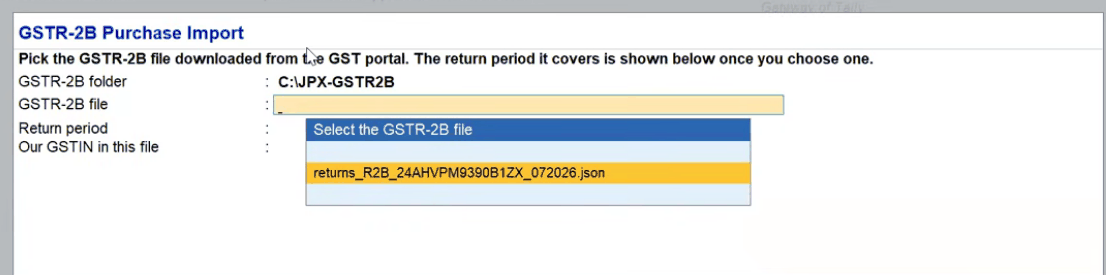
From Gateway, open GSTR-2B Purchase Import → Import GSTR-2B file (one click) / select file.
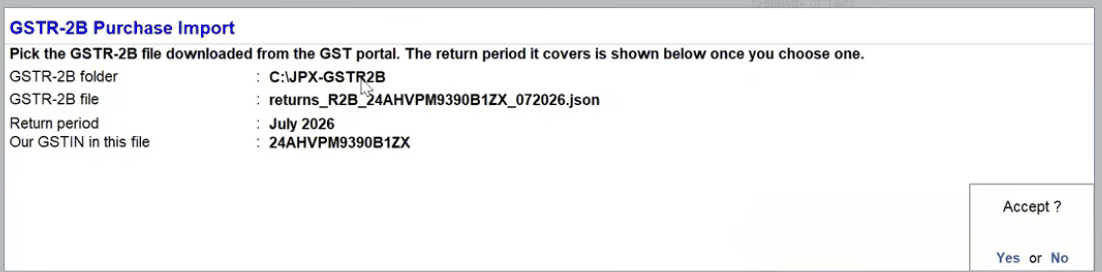
5) Select the JSON — period and GSTIN auto-fill
Pick the file. Confirm Return period and Our GSTIN, then Accept.
6) Check against books (nothing entered yet)
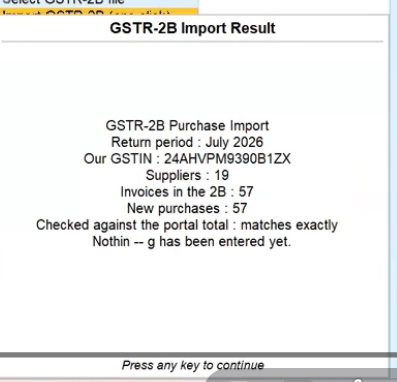
When prompted to check the file against books with nothing entered yet, choose Yes.
You get a summary such as: period, GSTIN, suppliers, invoices in 2B, new purchases, and whether the portal total matches exactly.
7) Create the purchases
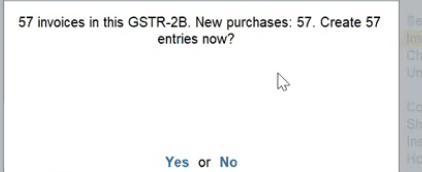
Confirm Create N entries now? → Yes (demo: 57).
8) Verify Purchase Register
Open the Purchase register for the month. Demo: 57 transactions, closing ₹8,33,456.
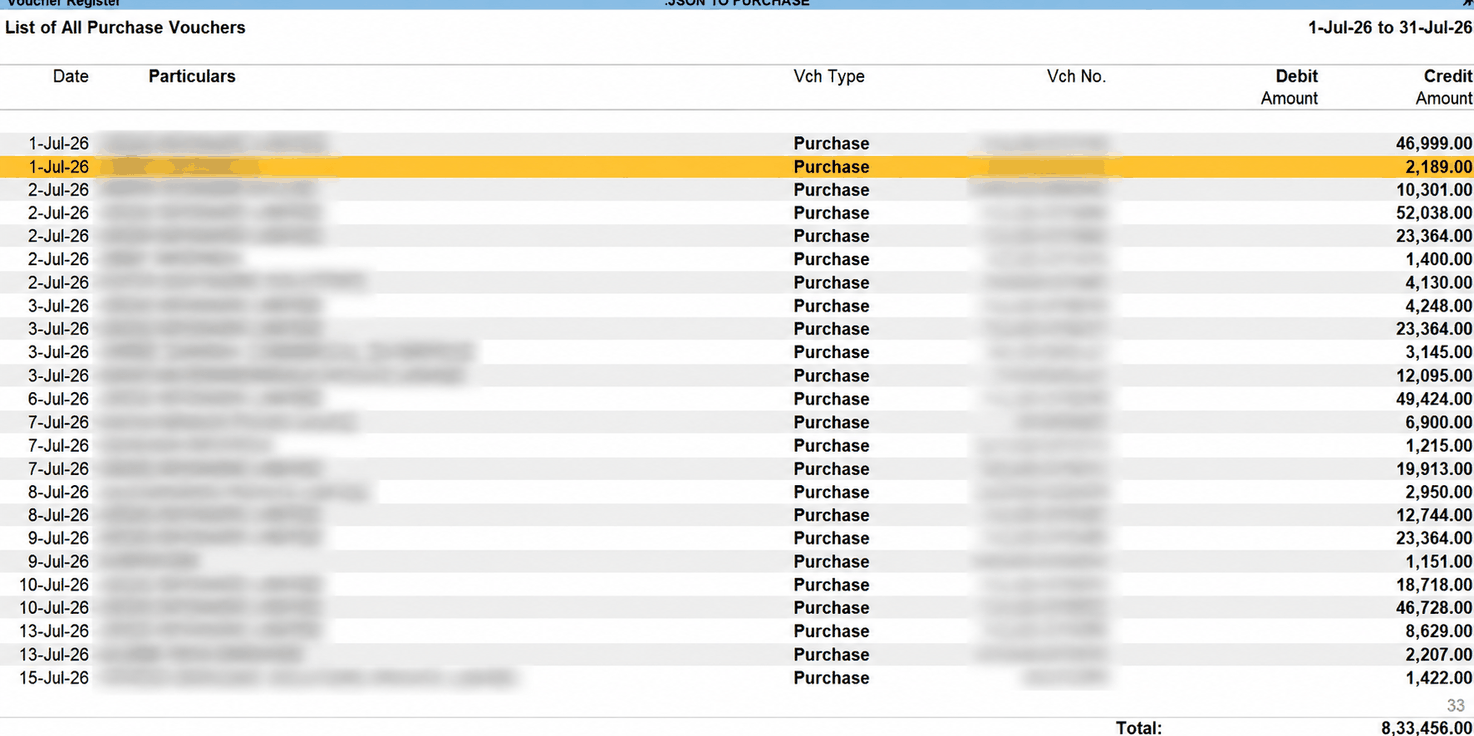
Open any sample voucher. You should see rate-wise purchase ledgers (e.g. Purchase 18%) plus CGST/SGST/IGST and Round Off as applicable; Tax Analysis should look clean.
9) Reconcile GSTR-2B and check GSTR-3B ITC
Run GSTR-2B Reconciliation for the same period. The demo was nearly exact; one invoice differed by ₹0.02 — fix paisa cases by hand.
Then open GSTR-3B for the month and confirm §4 Eligible ITC reflects the imported CGST/SGST/IGST.
Important limitations
- Accounting invoices only — GSTR-2B JSON has no full item/HSN stock lines.
- Mixed GST rates on one invoice — may need a manual alter after import.
- Round-off — sub-rupee mismatches can appear; clear them in reconciliation.
- Not a substitute for native reconciliation — this TDL creates vouchers; Tally’s report still checks them.
- GSTR-2B is not your whole purchase book — unregistered purchases, imports, and late-filed supplier invoices won’t be in that month’s 2B.
GSTR-2B Purchase Import pricing
- ₹1,499 + GST for 1 year
- Renewal ₹499 + GST
WhatsApp / call: +91 94263 91348 · +91 70695 00051
Web: tallyguj.in
Email: tallyguj@gmail.com / info@tallyguj.in
Frequently asked questions
How do I import GSTR-2B JSON into TallyPrime?
Download the GSTR-2B JSON from the GST portal, open GSTR-2B Purchase Import in TallyPrime and select the file. Confirm the return period and your GSTIN, choose Yes when asked to check the file against your books, then confirm Create N entries now? to post the purchase vouchers. Finish by running GSTR-2B Reconciliation for the same period.
Can TallyPrime create purchase vouchers from GSTR-2B JSON by itself?
No. Built-in tools are for reconciliation. Creating missing purchases from JSON needs a custom TDL such as GSTR-2B Purchase Import.
Do I still run GSTR-2B Reconciliation after import?
Yes — to confirm portal match and clear exceptions (including paisa round-off).
Will stock items / HSN update automatically?
No. Expect accounting purchase vouchers from JSON.
How long does a run take?
In the public demo, dozens of invoices (57) are created in a one-click pass after the JSON is selected. Your time then goes to review and exceptions, not typing.
How much does GSTR-2B Purchase Import cost?
₹1,499 + GST for one year, with renewal at ₹499 + GST.
Next step
Message Plug & Play Computers on WhatsApp with your TallyPrime edition and one sample month (sanitised). We’ll confirm fit and install GSTR2B IMPORT.tcp.
Built by TDL developers — practical add-ons, documented on @tallytipsntrick.